Edit metadata
Once you’ve uploaded your file or archive, you’ll now be able to edit the metadata by clicking the Edit Metadata button (Figure 3.2) on the right side. There you find a bunch of fields which you have to fill out (All fields marked with a * are crucial and have to be filled out!). But first, some basic information about the metadata.
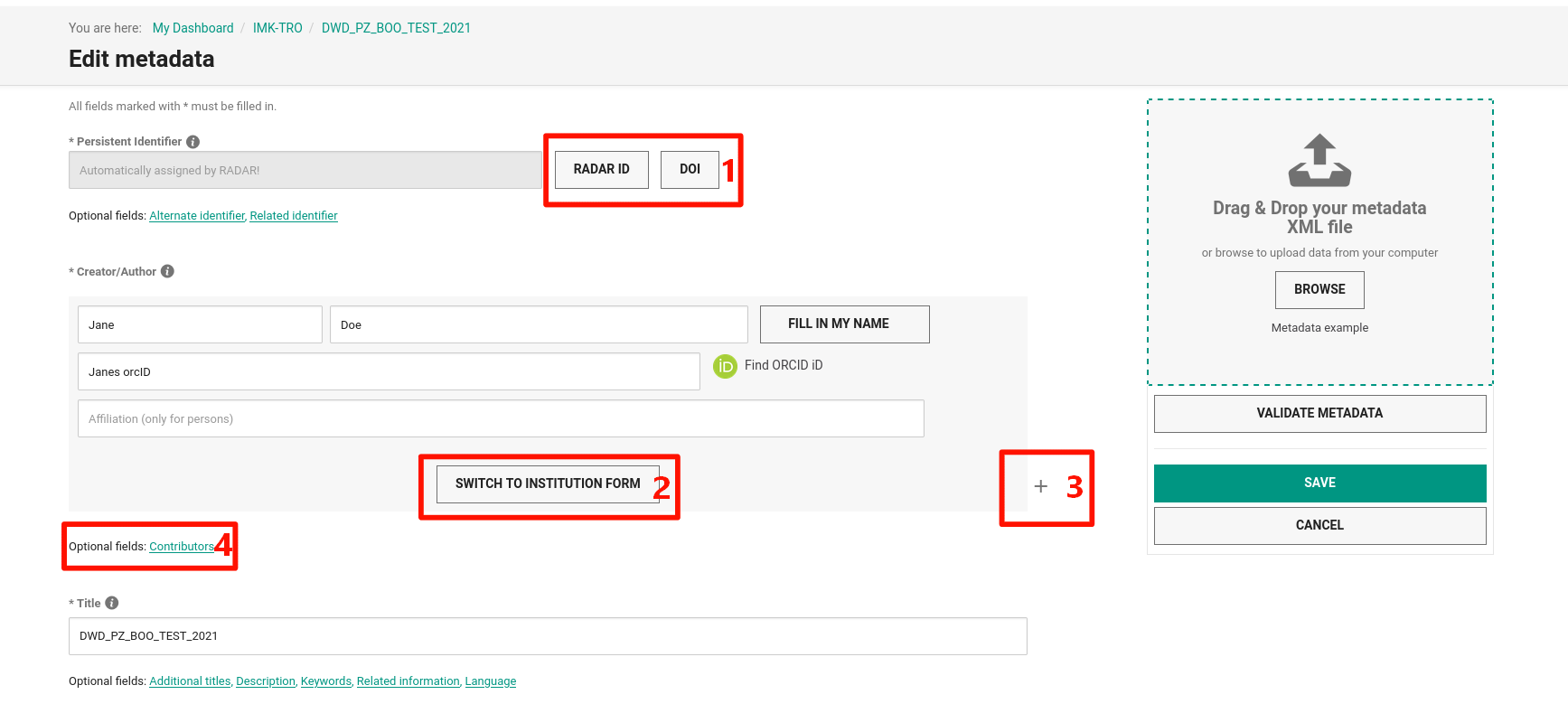
Fig. 5 Edit metadata form
One central task in RADAR is the creation of a metadata schema that will provide both interdisciplinary, centralized record of the research data archived and published in RADAR, and data archived and published in RADAR as well as fulfilling the subject-specific requirements for searching and subsequent use of these data. The following metadata profile comprises 10 mandatory fields, which together represent the general, descriptive part of the profile, as well as 13 optional fields, which also include the subject-specific descriptions of the datasets.
Important
The mandatory fields of the metadata profile contain the basic requirements for DOI registration according to the DataCite metadata schema.
You can find a full documentation of all metadata fields within RADAR in this Link, unfortunately this documentation is only available in German. However, the following paragraphs will explain and summarize the most important and mandatory fields in short.
Persistent identifier
The persistent identifier is an automatically filled ID by RADAR. On the right side you can choose between an RADAR-ID and a DOI (Figure 5.1). The DOI is recommended for planned data publication whereas the RADAR-ID is recommended if you plan to archive a dataset without any publication. As an optional option you can add some alternate identifier which means for example to add IDs from other repositories, or you can add a related identifier which basically is e.g. an ID from a journal publication related to the dataset or any documentation, data paper or citation of the dataset. You can link your dataset to a related publication with the related identifier.
Title
The title is a short term to describe your data set properly. Below the title form, you have some additional options like subtitles, descriptions, related information or languages. Even thou it is only marked as optional field and not marked with an asterisk for a needed field, we highly recommend to give as much information as you have to describe the dataset.
Publisher
Since you’ll archive or publish the data at RADAR4KIT, the Karlsruhe Institute of Technology is the organization for publishing the resource. There might be others if there is some collaborative work with other organizations or other published datasets which belongs to your dataset. If the publisher is represented by a person, the name should be following the name format family name, given name.
Production year
The production year is the year when the data was created. It can also be a time range of several years, in this case, give the time range from the first to the last year of the data production. The format of the year should be YYYY or in case of a time range YYYY-YYYY. If the year is unknown, type in unknown instead.
Publication year
The publication year will be filled automatically after the publication of the data.
Subject areas
The subject area means the research field in which the dataset fits most. In case of the Institute of Meteorology and Climate Research it might fit most of the time to either Computer Science, Environmental Science, Geological Science or Physics. If you need a free text to describe your subject area, select Others. You can also add additional subject areas if your data set fits into two or more research areas.
Resource type
The resource type describes the content of the resource (e.g. images, soundfiles, model data, software etc.). For the resource type are a few optional and also highly recommended fields available. Especially the Geolocation is really important. You can define a model area with a region or just a location of your sensor system by switching to the point form by clicking the Switch to point reference button. Once you’ve added the geolocation successfully, you’ll see the area of investigation now in the tab Technical Metadata as well. With the Data source you can describe what kind of data it is (e.g. model data, observation data etc.). And for respecting the FAIR Data Principles mentioned above, it is crucial to mention and link the software used for creating the data set. You can go into details using the Data processing field. If the dataset is post-processed in any kind, you can exactly tell what methods you’ve applied to the raw dataset to achieve the current and published dataset.
Rights statement for the dataset
This might be a bit a tricky point. If you are not sure about the rights on your dataset you should first contact your group leader. This field covers the license for the data package. The metadata is licensed with a CCO license by default. You can find a full description of the rights scopes at the RADAR glossary. It is recommended to use one of the creative commons (CC) licenses due to the wider spread of those licenses.
Rights holders
In general the KIT holds all rights on data which is created by its employees. Thus, the KIT might be the right choice in most cases here, but you can add at least additional right holders or optional funding partners, which might be important for some third party founding projects.